Configuring your Deribit account
To configure your Deribit account to connect to Fireblocks:
- Refer to the Deribit.com API Documentation to learn how to generate a new API key.
- When prompted to do so, name your new API Key “Fireblocks.”
- After you confirm the validity of your new API key, copy and keep a record of both the Access Key and Access Secret. You will need them when connecting this exchange to your workspace.
- When creating the new key, make sure you toggle these options as follows:
- Account: read_write
- Block trade: none
- Trade: read
- Wallet: read_write
-
Custody: none
- Enable read_write if you plan to use Deribit Off Exchange
- Restrict API access and whitelist the following IP address: 52.76.208.129
- Make sure 2FA is enabled on your Deribit account. This is required to connect this account to Fireblocks.
Note
Deribit Off Exchange is a separate serivce that requires a different configuration. Learn more about Deribit Off Exchange.
Configuring Fireblocks
- In the Fireblocks Console, go to Accounts > Connected accounts.
- Select + Connect Account.
- Select Deribit, then select Main Account, and then complete the following fields:
-
- Name on Fireblocks: Enter the name you want to give this exchange account on Fireblocks.
- Access Key: Enter the Access key that you saved from Deribit.
- Access Secret: Enter the Access secret that you saved from Deribit.
- Two-Factor Token: Enter the 2FA token you copied from Deribit.
- Select Connect Account.
The Admin Quorum must approve the new account to make it available for new transfers from your workspace.
Your Deribit account appears on the Exchanges page along with all managed assets and their balances. Following Admin Quorum approval, transfers are available from your vault accounts, whitelisted addresses, Fireblocks P2P Network connections, and other connected exchange accounts to your Deribit account.
Enabling withdrawals from Deribit
See the Deribit documentation to learn more about adding a withdrawal address to your address book.
Learn more about enabling exchange account withdrawals in Fireblocks.
Deribit sub-accounts
Learn more about connecting a Deribit sub-account.
Troubleshooting
Why is my withdrawal from Deribit stuck on Broadcasting?
Deribit requires email approval for all withdrawals
- If you have not approved the email, try approving the transaction.
- If it is still stuck, initiate a new transaction and retry the approval process, as the approval email has most likely expired.
- If you have attempted both previous steps and the funds have still not been successfully withdrawn, contact Fireblocks support for further investigation.
Deribit 2FA is required to withdraw using Fireblocks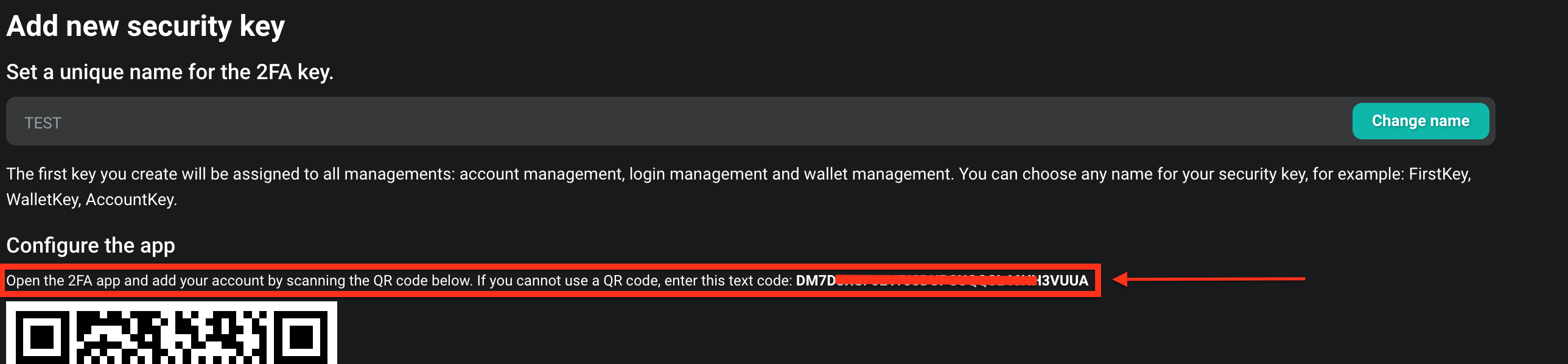
- If you receive an "invalid third party response" notice when attempting to withdraw from Deribit, it likely means two-factor authorization (2FA) is not defined for Deribit. To resolve this, copy the 2FA token from Deribit and paste it into the Fireblocks platform as shown in step 3 of the Deribit account guide.
- If you still have difficulties, contact Fireblocks support.